
A minimal workflow for AI-assisted coding
Or getting better at rolling the dice.

I’m really enjoying working with LLMs to help me write code faster! Why’s that? The first aspect is that it’s new, and who doesn’t like playing with new and shiny and constantly changing technology? But the other part is that it is clearly a technology that’s going to result in a big change (good or bad).
Many people don’t share that enthusiasm though. Some of the objections I’ve seen around AI coding tools is:
It’s a threat to my existence - I hope it isn’t. It depends why and what you’re into! At the very least, surely you should know your enemy.
Copyright infringing bastards - AI’s original sin. My hope is that OSS models, clean training sets and attribution will eventually right the wrong.
It’s probabilistic - I don’t buy this at all! All the work we do is probabilistic as engineer; we work with uncertain requirements, unreliable distributed systems and humans. If we had certainty, then we’d have already been out of a job.
My stuff is super complicated and special - Yup, there’s definitely limits. I certainly wouldn’t want to code safety-critical systems with LLMs. I’d guess the reality is that most codebases aren’t really special (sorry!), it just feels that way to folks who’ve had to struggle to understand a gnarly legacy code base.
But my craft! - Yeah, I feel you. But as you’ll discover, caring about the craft, about software design is still the best way to get value from LLMs.
But for some, I think they just don’t know how to get started. They see a prompt like the strawberry question, and just dismiss LLMs as a toy, or they try with some basic prompting, and it doesn’t get it right, so the toy label gets applied again.
This post is for those folks and aims to provide some things that I’ve found useful. You might not find it useful, but that’s OK, I’m just trying to share some ideas, not change your mind!
What’s worked for me?
Work in small chunks with a well-defined idea of what you’re building, and a plan. Then slap in an agentic loop to get work done, wiring in external capabilities as necessary.
You may notice the parallels here in how humans work, and I don’t think that should be a surprise! This is primarily why I don’t buy the “my craft!” arguments. It’s still there! You have to get all the pieces of the craft in place; you just need to vocalise it to the AI tool (just as you would to the new software engineer on the team).
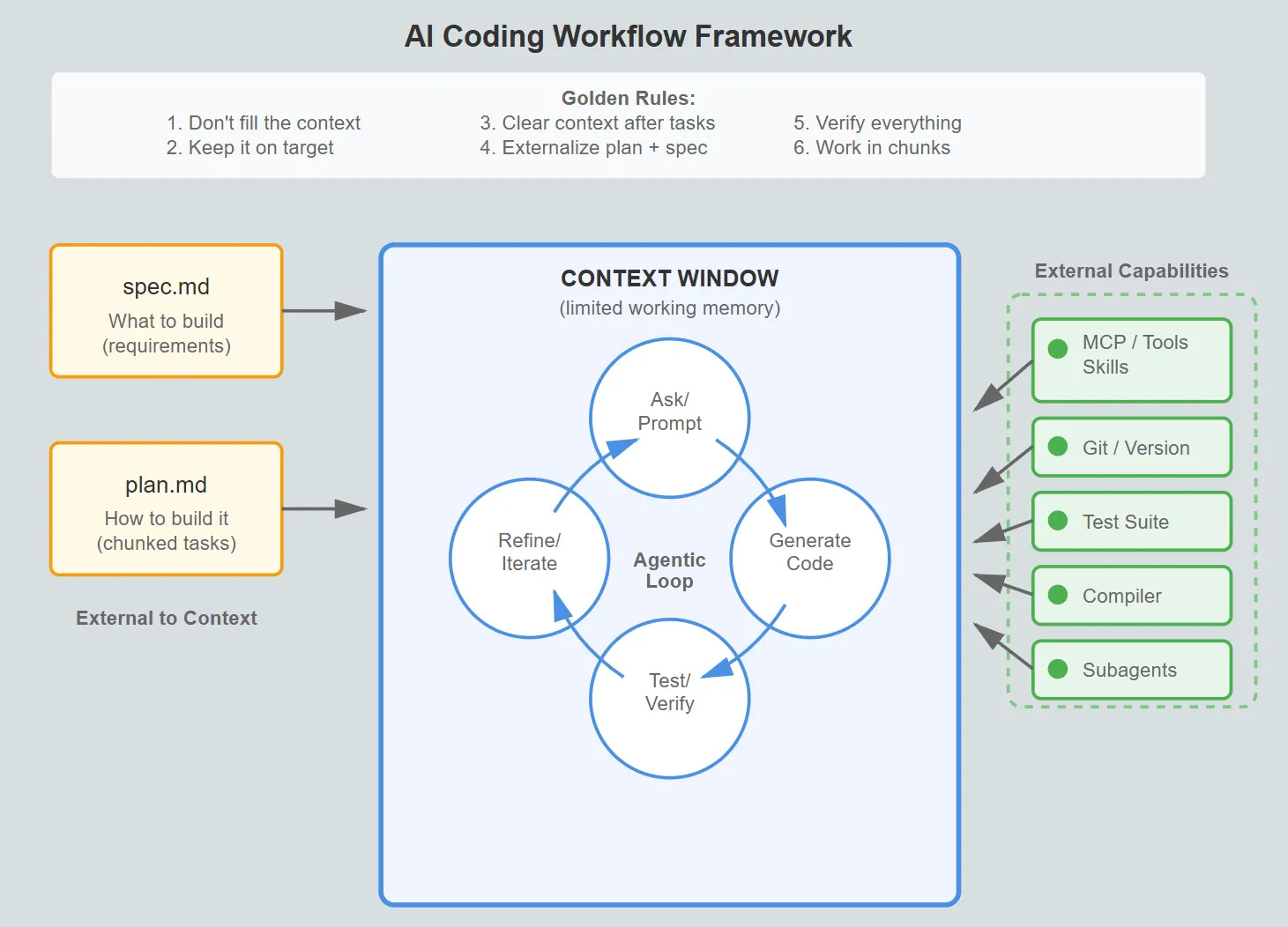
Let’s dive into each of the bits in a little bit more detail.
Remember, Context is King
An LLM has a context window. Think of a context window as the working memory of an LLM. Once you fill the context window, then the early parts of your conversation will be discarded (or compacted with clever models). You have a context window too - about 7±2 items in working memory1. Once it’s full, earlier information gets pushed out.
With both Claude and Copilot, you can see the context window. Here’s an example of my context window (/context ) after a few rounds of iteration:
With system prompts, tools, MCP, agents (and so on), that 200K token buffer doesn’t go as far as you might think…
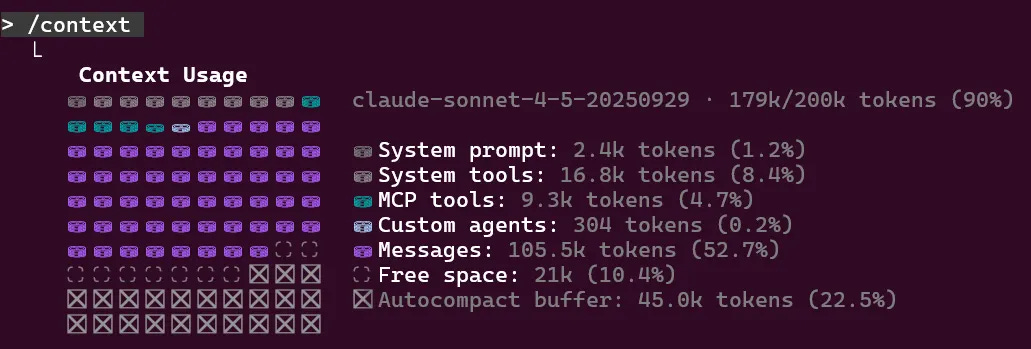
As the context window fills, I’ve found you get poorer performance. “Lost in the Middle: How Language Models Use Long Contexts” explored this phenomenon in 2023, since then context windows have got much larger but I still feel the same problem today.
My golden rules for context management are pretty simple.
Don’t fill it up - If you fill the context window up, then some key concepts will be lost. Bad things will happen.
Keep it on target - Don’t get distracted by yaks to shave unless its sat on the critical path.
Regularly clear the context - When you’ve finished a task, clear the context. But in order to do that, you’ll need a plan which brings us to the next section.
Know what you’re trying to do
It’s clear what you want to do only if you can write it down and explain it to someone else. The same is true with a coding assistant, it’s not a mind-reader! If there’s room for ambiguity, then assumptions will be made.
I start each feature by trying to write down a SPEC.md file (nothing special about the name!). This is an English language description of what I’m trying to build. As I’m writing it, I’ll realize how much I don’t know. I’ll often use an LLM to iterate on the specification, ask probing questions and act as a thinking partner. It’s not a replacement for a human.
Once you’ve got a decent spec file, it’s useful for humans as well as the AI! And once you’ve got a spec, you’ll need a plan.
Make a plan!
If you ask an LLM to do too much in one go, then you’ll fill the context window as you constantly have to course-correct, or simply generate too much code to fit in it. Instead, you need a plan, breaking down the work into small lumps.
Often this can be as simple as:
I’d like to implement @spec.md, please produce a corresponding plan.md.
With claude , you can engage plan mode with Shift+Tab, but remember that key thing is to externalize the plan from the context. Make it so you can clear the context and still have the plan.
I’m currently experimenting with task management system called beads (from Steve Yegge) that’s designed to work with LLMs. It encodes this pattern of working nicely! Still early days, but I like the direction it’s going in and would heartily recommend experimenting.
Pair beads with Claude Superpowers, and it gives the ability to execute a plan using subagents. Again, super early days, but if you have the right feedback loop, you can work through the tasks in a plan using a subagent to ensure the context never gets filled.
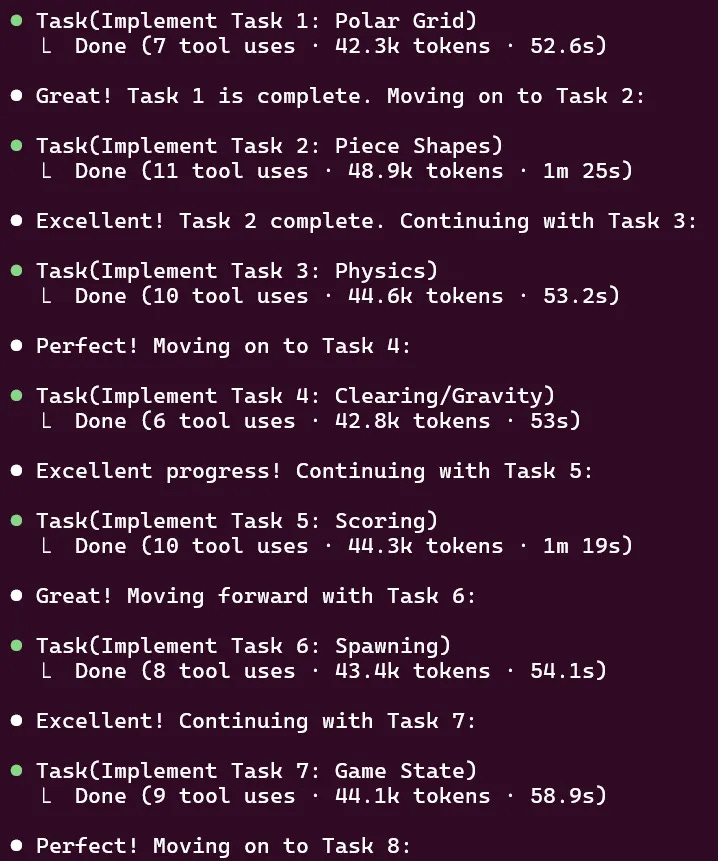
Agentic Feedback Loops
Once you have your plan broken into chunks, each chunk needs a verification loop (an agentic feedback loop).
To unpack that a little, how will the AI know that it’s working? How will any problems with the implementation make it back into the AI context to be resolved?
You should consider tests to be table stakes. Tests help you define the behaviour you want to keep and maintain throughout the lifetime of the product. A failing test provides feedback to the AI that something is broken. A passing test gives you confidence that behaviour hasn’t broken. But tests are just the start.
What other feedback mechanisms could you have? You might have linters, static analysis or fuzz testing. You might have a custom script that produces a text file. You can have anything! The key point is building feedback loops that give useful information back into the LLM.
Simon Willison’s example of Getting DeepSeek-OCR working on an NVIDIA Spark via brute force using Claude Code is fantastic for showing the context and tools you need to solve a hard problem.
If that’s the general workflow, how’d you get the most out of it?
Capabilities > Prompting
In the early days, there was a dark art of how you’d whisper the right incantations to the AI. Nowadays, I find that much less true. The dark art these days is putting the right capabilities into place. Those capabilities are the tools that make those agentic feedback loops work.
MCP servers
Tools
Skills
Too many of these and you’ve not left room in the context window for your question. Not enough, and you’ll have to manually add context from somewhere else (or just accept it’s missing).
Ensure that you’re connecting the right things to your AI (subject to privacy, security and all that good stuff).
Use git well.
Coding assistants can go off the rails, but by working in chunks you can keep it under control and keep a record of everything you’ve explored. This basically boils down to good versioning practice. It’s free to create branches, and with git worktrees you can keep work isolated.
I’ve found that keeping track of prompts you’ve used (/export) is super useful as a record of what works and what doesn’t.
Own it!
You, human, are responsible for the output of the AI. You’re shipping production code written by a probabilistic system you don’t fully understand. This should scare you!
Stay sane by following the process. Have a spec and a plan. Critically review them. It’s your responsibility to keep the AI on track. The AI is a tool that you use to produce software. A bad work man blames their tools. Don’t!
What doesn’t work?
AI still has failure modes, as do I when I’m using them!
Chat.
I used to say that one of the key things about learning to use an LLM was to have a back-and-forth dialog with it to nudge it in the right direction.
Now I’m learning to realize that each time I do that, it’s because I’ve done something wrong. Your goal when using an AI Assistant to write code is to get it right first time.
If it’s written in the wrong style (something like use LINQ instead of loops), then you’re better off resetting and adjusting the requirements accordingly.
If there’s an edge case, don’t try to correct it. Adjust the spec, throw away and start again.
If you’re arguing with it because it’s got the wrong end of the stick, then start again. Either re-roll the dice or provide more context.
I find it useful to separate out using claude (my code-writing buddy) from Claude (the desktop app, and brainstorming buddy). One is a tool for writing code, the other is a chat interface.
Believing everything.
Perfect! I found the issue, your system has a broken compiler.
If you’ve asked the AI to find and fix a problem, and the AI can’t, then it’ll eventually come up with a plausible sounding explanation that is completely bonkers. This is the hallucination problem; AI isn’t very good at giving up and will try to suggest a solution if there isn’t one. This situation is improving, but it still happens.
If something sounds odd, it probably is, and it’s definitely worth verifying. Unless you’ve seen the tests run, it’s worth running them yourself (and so on).
Outsourcing critical thinking
Don’t outsource critical thinking to your LLM. They are getting increasingly good at finding solutions, but all solutions involve trade-offs. For high-stakes decisions you must be the one making the trade-offs.
By all means, use the AI to brainstorm, critique ideas and generate options, but you can’t escape the hard stuff which is picking which trade-offs matter most to you in your unique context.
When you’re in a hole, keep digging
There’s a strange phenomenon that makes you think you’re one dice-roll away from the magic statement to the AI that will resolve all your issues. I’ve rarely found that true, but despite that I’ll keep persisting with prompt after prompt. There are many psychological reasons here, and I’ll chose to believe that they are an accidental property of AI Code Assistants rather than a deliberate conspiracy.
It’s like a slot machine that pays out occasionally (variable ratio reinforcement), each spin shows you symbols that are almost matching (near-miss effect), and you’ve already put $20 in (sunk cost fallacy). Each failed attempt makes you more invested in proving that it’ll work (escalation of commitment). The rational choice is to walk away and start fresh, but our brains aren’t wired that way.
The big lesson here is to stop, take stock. And to also recognize that this is easier said than done.
If you find the size of the change is bigger than you’d expect, it’s probably time to revert to an earlier revision, and try a smaller step.
Poacher and Game-keeper
Don’t create a situation where the LLM is both poacher and game-keeper. If you’re writing tests and implementation in a single step of the plan, you risk an ambiguity become fixed by a test. My general heuristic is to use subagents to perform checking tasks. And (of course), get a human to look in regularly!
Left unchecked, AI-generated PRs can be much larger, which means your review process becomes the bottleneck (or worse, skipped!) and then resentment builds against AI and adoption stops.
LLMs writing code in a language you don’t understand
My worst experience with AI was a PR in TypeScript / React to add some capability to an internal tool.
I was pretty proud of myself - it worked! I manually tested it, and the code looked good from 30,000 feet. No sprawling indentations, blast radius seemed sensible.
But when I shared it with someone who knew what they were doing it was mildly embarrassing to say the least! A slew of small things, and an overall misunderstanding meant my colleague wasting more time diplomatically saying “WTF” to me than it would have taken to write it again from scratch.
Lesson learned!
Conclusion
It’s still early days with AI coding, and we should expect rapid change. That’s the fun part! But be too late to the party and you’re going to get left behind. Start today by writing a spec for your next feature and breaking it down into small chunks, and using agentic verification loops to get stuff done.
Let’s illustrate the working memory. You are the driver of a bus with 13 passengers on. You move one stop on, and six passengers get on, and four passengers get off. At the next stop, three passengers get off, and a passenger gets on walking a dog and carrying a cat in a strange basket contraption. At the next stop, fifteen people get on (the local football match has just finished) and three people (not including the person with the pets get off).
Now the big question to see if you’re paying attention. Who was the driver of the bus?
Your golden rules for context management are solid. The "don't fill it up" one is the hardest for people to internalise because it feels counterintuitive. You'd think more context = better results, but it's the opposite past a certain point.
I've been taking the "regularly clear the context" rule to its logical extreme with multi-agent setups. Rather than clearing and restarting within one session, you delegate chunks of work to sub-agents that each start with a clean window. They do their thing in isolation and report back a summary. The main thread never sees the intermediate mess. Covered the mechanics of how Codex does this natively https://reading.sh/codex-has-a-multi-agent-mode-and-almost-nobody-is-using-it-088e44f774ef and it builds on exactly what you're describing here. Your SPEC.md approach would pair well with it too since each sub-agent could reference the spec independently without polluting the parent context.
Your point about working in small, well-defined chunks resonates deeply. I've been building Wiz - a personal AI agent using Claude Code - and the biggest lesson was exactly this: the AI is brilliant at executing clear specs, but struggles with ambiguous scope.
The feedback loop through testing is crucial. I found that building verification layers into my agent workflows made the difference between "cool demo" and "reliable system." Now my agents run overnight with confidence because they have guardrails.
One thing I'd add: persistent context matters as much as chunk size. I maintain a CLAUDE.md file that grows over time with preferences, past decisions, and learned mistakes. It's what turns Claude Code from a conversation partner into a team member with memory.
For anyone looking at AI-assisted coding honestly (what works vs. the hype), I wrote about my experience here: https://thoughts.jock.pl/p/claude-code-review-real-testing-vs-zapier-make-2026